Network Firewall Rules Every Admin Should Know
It is 2:15 AM. Your phone violently buzzes on your nightstand with a critical alert: your core database server is experiencing an unprecedented spike in traffic originating from an unfamiliar international IP subnet. Within twenty minutes, your company’s internal portal goes dark, rendering your team completely blind. As you dig through the connection logs with blurry eyes, you discover that a rogue automated scanner found a single, forgotten testing port left wide open to the public web.
Over my ten years configuring robust network perimeters and securing critical data pipelines in the high-stakes HealthTech sector, I have audited dozens of infrastructures. If there is one crucial insight I can share from the front lines, it is this: complex security tools are entirely useless if your baseline traffic hygiene is sloppy. Most devastating network breaches do not involve sophisticated, sci-fi style AI malware hacks; they succeed simply because a basic rule was missing from the configuration matrix.
Mastering network firewall rules is the single most impactful step you can take to safeguard your infrastructure. Let’s break down the essential rulesets that every beginner and intermediate administrator should implement immediately to lock down their perimeter.
The Traffic Bouncer: How Firewall Rules Operate
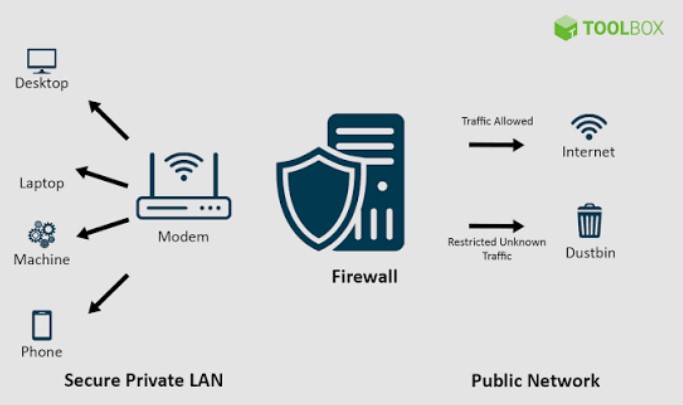
To understand how network firewall rules work under the hood, think of your network as an exclusive, high-security corporate office building. The firewall is the security guard standing at the main turnstile, checking everyone’s credentials.
Every single piece of data moving through the web travels inside a “packet,” which contains a source address, a destination address, a specific transport protocol, and a destination port. The firewall reads this packet data and compares it against your rule table from top to bottom. The moment a packet matches a rule’s criteria, the firewall executes the corresponding action—Allow (Pass) or Deny (Drop)—and completely ignores the rest of the list beneath it.
The Power of Port Architecture
Every application on your server relies on a specific port number to communicate. Think of an IP address as the building’s street address, and the port number as the specific room number inside. If you leave a port wide open without an explicit restriction, you are essentially leaving the door to that specific room completely unlocked for any passerby.
The Non-Negotiable Rules Matrix: Five Rules Every Admin Needs
Building a secure firewall profile does not mean creating hundreds of chaotic parameters. A rock-solid defense relies on a lean, prioritized set of core network firewall rules.
1. The Foundation: The Implicit Deny Rule
This is the absolute golden rule of network administration. Your very last firewall rule—placed at the bottom of your table—must be a catch-all block that denies all inbound and outbound traffic that hasn’t been explicitly permitted above it.
-
Why It Matters: By adopting a zero-trust architecture, you ensure that if you forget to configure a rule for a new service, the firewall defaults to keeping the door locked rather than leaving it wide open.
2. Safeguarding the Core: Restricting Remote Management (SSH/RDP)
Secure Shell (SSH on Port 22) and Remote Desktop Protocol (RDP on Port 3389) are the keys to your server’s castle. Leaving these ports accessible to the public internet is an invitation for brute-force attacks.
-
The Rule: Restrict access to Port 22 and Port 3389 exclusively to specific static internal IP addresses or your company’s encrypted Virtual Private Network (VPN) subnet.
3. Securing Web Infrastructure: Standardizing HTTP and HTTPS
If your server hosts a public website or an API endpoint, it needs to talk to the outside world. However, you must enforce modern encryption standards.
-
The Rule: Allow inbound traffic on Port 443 (HTTPS) from any source to ensure secure, encrypted communication. Meanwhile, you can explicitly block or redirect traffic on Port 80 (HTTP) to prevent unencrypted data transfers.
4. Isolating Internal Infrastructure: The Database Lockdown
Your database servers (running on ports like 3306 for MySQL or 5432 for PostgreSQL) should never communicate directly with the outside internet. They only need to talk to your web application server.
-
The Rule: Create a strict rule that allows inbound traffic to your database port only if the source IP matches your specific web server’s local IP address. Drop all other traffic attempts instantly.
5. Managing Outbound Security: Restricting DNS Traffic
Many administrators make the mistake of leaving outbound traffic completely unrestricted. Malicious actors frequently use Domain Name System (DNS) tunneling on Port 53 to exfiltrate stolen data from compromised servers.
-
The Rule: Limit outbound traffic on Port 53 (DNS) exclusively to your trusted, secure upstream DNS resolvers (such as Cloudflare’s 1.1.1.1 or Google’s 8.8.8.8), blocking all other unauthorized alternative endpoints.
Essential Firewall Reference Matrix
To help you visualize your new configuration layout, here is a standard baseline rule architecture arranged by execution priority:
| Rule Order | Description | Protocol | Destination Port | Source IP | Action |
| 1 | Secure Management Access | TCP | 22 (SSH) / 3389 (RDP) | Trusted VPN Subnet | ALLOW |
| 2 | Public Web Traffic | TCP | 443 (HTTPS) | Any External IP | ALLOW |
| 3 | Database Isolation | TCP | 3306 (MySQL) | Web Server Local IP | ALLOW |
| 4 | Outbound DNS Control | UDP/TCP | 53 (DNS) | Internal Network | ALLOW (To Trusted Resolvers Only) |
| 5 | The Safety Net | Any | Any | Any | DENY (Implicit Deny) |
The Pitfalls of Rule Ordering
When deploying network firewall rules, the order of operations is absolutely critical. Because firewalls read rules sequentially from top to bottom, a single misplaced rule can leave a massive hole in your defenses.
The Top-Down Trap
Imagine you write a brilliant, highly restrictive rule that blocks all external traffic to your management database on Port 3306. However, three lines above it in your control panel, you have a generic rule that says “Allow all traffic from Any to Any.”
Because the firewall hits that generic “Allow” rule first, it will let the traffic pass straight through, completely ignoring your specific block rule underneath it. Always place your most specific, restrictive rules at the very top of your table, and your broadest rules toward the bottom.
Pro Tip: The Logging Imperative
Always enable logging on your default “Deny” rules. When things inevitably stop working during a deployment, your firewall drop logs will show you exactly which port is being blocked in real-time. This saves you hours of frustrating guesswork trying to diagnose whether a service is down or simply blocked by your security policy.
Conclusion: Take Control of Your Perimeter
Securing your network infrastructure does not require overly complex enterprise setups or an overwhelming budget. By implementing a zero-trust baseline, prioritizing the network firewall rules that protect your core management ports, and maintaining strict order over your rule tables, you remove the vast majority of opportunistic security risks. Defensive network design isn’t a one-time chore; it is an ongoing practice of maintenance and clarity.
Are you getting ready to audit your current router firewall tables tonight, or are you designing a fresh ruleset for a new home lab server? Which specific port configuration has given you the most troubleshooting headaches in the past? Drop your thoughts or questions in the comments below—let’s talk network security and get your perimeter completely dialed in!
About The Author
